Reducing AI's Dependency on Figma Standardization Through Engineering
Scenario: Figma file in, Claude Code auto-generates a PR
Introduction
In large tech companies, standardization is extremely expensive.
For design teams specifically, without centralized governance, Figma files are consistently under-standardized — chaotic component naming, hardcoded styles, manually positioned layouts. This is the norm, not the exception.
In the era of human-led coding, engineers absorbed this problem through experience: mentally mapping Figma components to code based on their understanding of the design system, supplemented by multiple rounds of back-and-forth with designers. Inefficient, but human comprehension and communication ability masked the design side's lack of standards.
In the era of AI autonomous coding, this buffer layer disappears.
AI isn't lacking context — through memory, codebase context, and CLAUDE.md, it can accumulate project understanding. What's truly missing is the ability to negotiate ambiguity in real-time: a human engineer sees a weird Figma frame and Slacks the designer to confirm intent; AI can only make its best guess from available signals, unable to initiate multi-turn conversations to resolve uncertainty.
This means Figma's standardization level now directly impacts code output quality in an unprecedented way — because AI lacks the human fallback of "just asking someone when something's unclear."
This raises two core questions:
- How much does Figma standardization actually affect AI code output quality? Which dimensions are critical variables, which can be ignored?
- How can we use engineering to reduce AI's dependency on Figma standardization? Making the pipeline produce high-quality PRs even from non-standardized Figma input.
Part 1: Diagnosis — How Figma Standardization Affects Output Quality
1.1 Signal Chain Decomposition
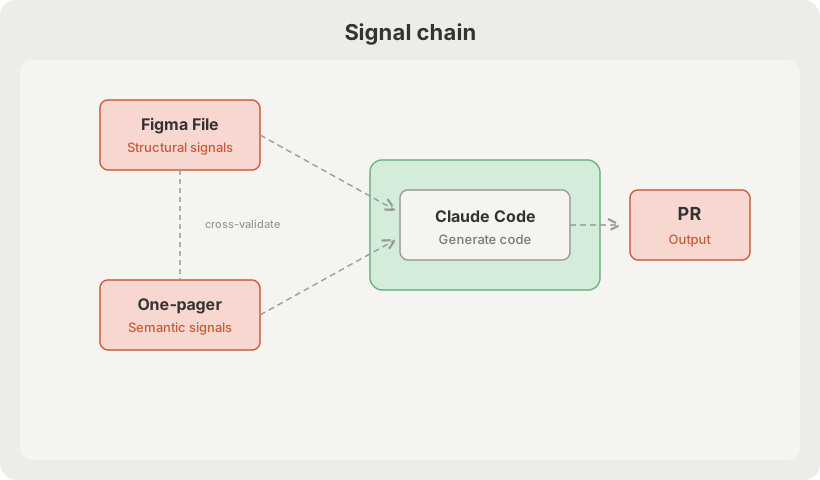
The two inputs have fundamentally different signal types:
| Source | Signal Type | Impact Domain |
|---|---|---|
| Figma | Structural, visual | Component tree, styles, layout |
| One-pager | Semantic, intent-based | Business logic, interaction flows, state management |
Their relationship isn't complementary — it's cross-validating: Figma tells AI "what the UI looks like," the one-pager tells AI "what this UI is supposed to do." When Figma naming is chaotic, business terminology from the one-pager can help infer component intent (e.g., the one-pager mentions "user submits form," so that blue thing called Rectangle 247 is probably a Submit Button). This cross-validation capability is concretely leveraged in Part 2's Semantic IR layer.
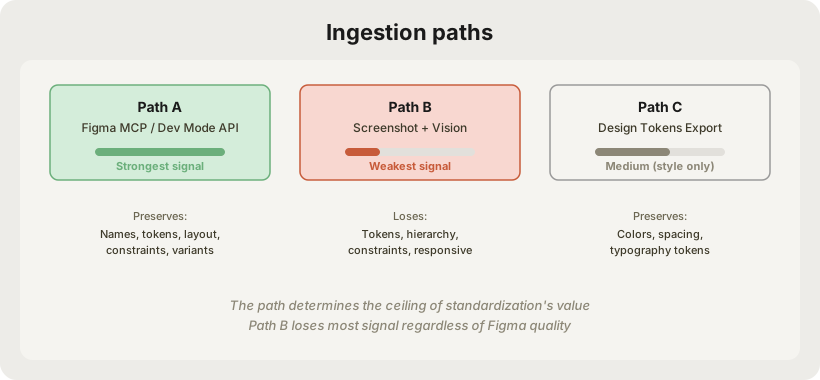
1.2 How Figma Data Enters Claude Code
The impact of standardization depends first on the ingestion method:
1.3 Impact Weight of Each Standardization Dimension
Component Naming — Weight: Highest
Non-standard: btn_v3_FINAL_use_this / Rectangle 247
Standard:     Button/Primary/Large
// "Button/Primary/Large" → <Button variant="primary" size="lg" />  ✅
// "Rectangle 247"        → <div style={{...}}>  ???               ❌
Naming is the semantic bridge. Chaotic naming means Claude can't do component mapping — it degrades to generating raw divs, destroying design system reusability.
Design Token Usage vs Hardcode — Weight: High
Non-standard: fill = #3B82F6
Standard:     fill = color/brand/primary/500
// Hardcode → generated code
<div style={{ backgroundColor: '#3B82F6' }} />   // technically correct, engineering wrong

// Token → generated code
<div className="bg-brand-primary-500" />          // connects to design system ✅
Token adoption directly determines whether generated code can be maintained long-term with the design system. It's the core source of tech debt.
Auto Layout Usage — Weight: High
Non-standard: manually dragged positioning, absolute position
Standard:     Auto Layout + Constraints
Auto Layout (Horizontal, gap=16, padding=8)
       ↓  Claude Code's translation is deterministic
display: flex; flex-direction: row; gap: 16px; padding: 8px;  ✅

Manual positioning x=120, y=48
       ↓  Claude must guess the intent
position: absolute; left: 120px; top: 48px;  // almost certainly wrong  ❌
Responsive layout generability entirely depends on Auto Layout usage.
Component Variants Structure — Weight: Medium
Non-standard: Button_disabled, Button_hover, Button_active (separate frames)
Standard:     Button component + Variants: {state: default|hover|disabled|active}
// Standard Variants →
interface ButtonProps {
  state: 'default' | 'hover' | 'disabled' | 'active'  // ✅ direct mapping
}
// Separate Frames → Claude may generate multiple independent components, or guess wrong prop structure  ❌
Layer Organization & Annotations — Weight: Low
Relatively low impact, but affects code organization for complex pages (which divs should be split into sub-components).
1.4 Minimum Viable Standard
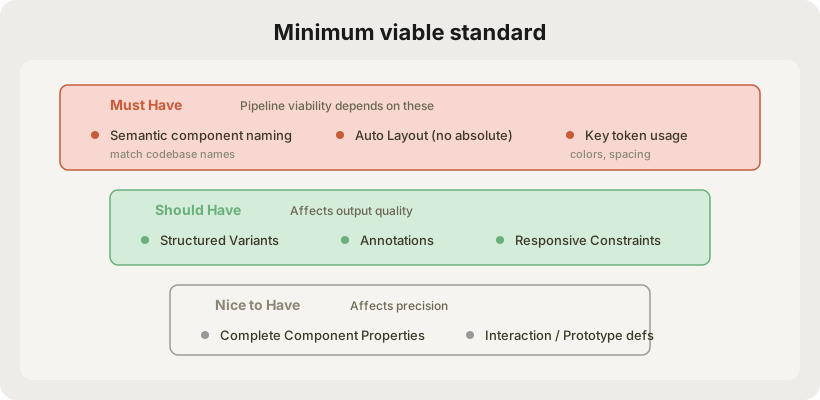
Part 2: Engineering Solutions — Improving the Pipeline to Reduce Standardization Dependency
2.1 Reframing the Root Cause
The real pain point isn't that Figma is non-standard — it's that the pipeline feeds Figma's raw signals directly to Claude Code, missing a "signal cleaning + semantic enrichment" middle layer.
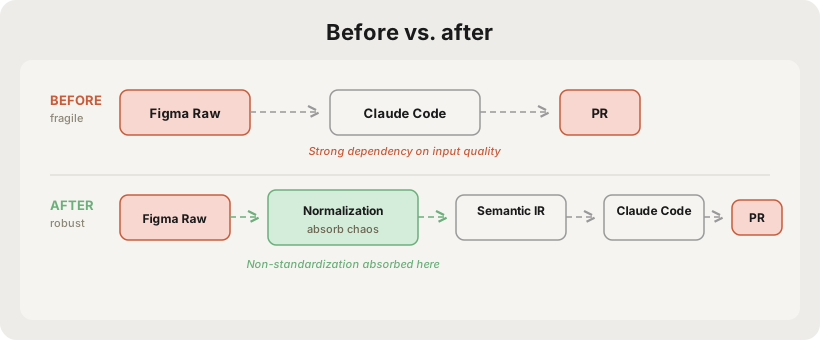
2.2 Core Improvement: Inserting a Semantic IR Layer
Introduce a Figma-agnostic intermediate representation (IR) that translates Figma's raw structure into a semantic description friendly to Claude Code, decoupled from whether Figma is standardized or not.
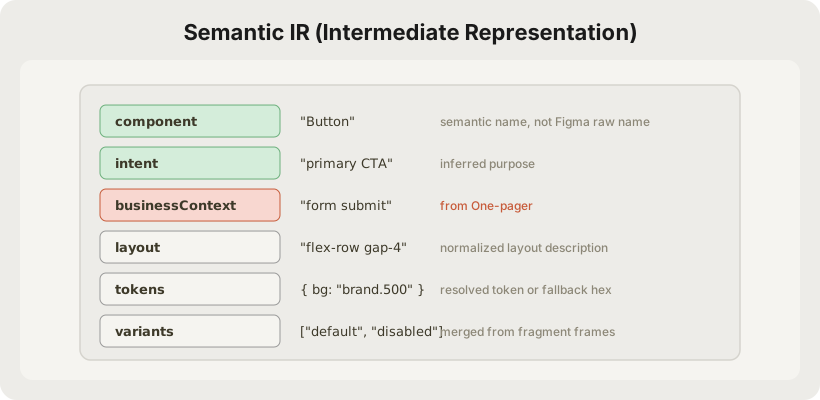
This layer's job is to absorb Figma's chaos and output structured certainty. Note the businessContext field — this is the injection point for the one-pager's semantic signal. When Figma structural signals are insufficient (e.g., chaotic naming), the Normalization Agent uses business descriptions from the one-pager to cross-validate and complete component intent.
2.3 Specific Improvement Strategies
Strategy 1: Figma Preprocessing Agent (Name Normalization)
Specifically addresses naming chaos with a lightweight LLM pass for semantic inference:
def normalize_component_name(node, onepager_context=None):
    context = {
        "raw_name": node.name,            # "btn_v3_FINAL"
        "visual_properties": node.fills,   # blue fill, rounded corners
        "children": node.children,         # contains Text "Submit"
        "parent_context": node.parent,     # inside a Form
        "business_hints": onepager_context # one-pager mentions "order submit button"
    }
    # business_hints provide extra signal when raw_name is unrecognizable
    # → infers "Button/Primary", confidence=0.92
Key design: outputs a confidence score. Nodes below threshold are marked needs_review, triggering manual confirmation or fallback strategies.
Strategy 2: Visual Grounding to Supplement Structural Information
For absolute positioning and other cases where JSON can't convey intent, proactively combine screenshots:
def resolve_layout(json_node, screenshot_region):
    json_layout = parse_json_layout(json_node)
    vision_layout = infer_layout_from_image(screenshot_region)

    if json_layout.type == "AUTO_LAYOUT":
        return json_layout                           # JSON is reliable, use directly
    elif vision_layout.confidence > 0.85:
        return vision_layout                         # screenshot inference fills the gap
    else:
        return LayoutIntent.UNKNOWN                  # mark for review
This way, whether Auto Layout is used or not doesn't become a blocker.
Strategy 3: Component Registry (Aligning with Codebase)
Don't let Claude Code guess components from Figma names — proactively build a Figma → Codebase mapping table:
# component-registry.yaml
mappings:
  - figma_patterns: ["btn*", "button*", "*Button*", "Rectangle*blue*"]
    code_component: "Button"
    props_map:
      fill_blue: "variant=primary"
      fill_gray: "variant=secondary"
      opacity_50: "disabled=true"

  - figma_patterns: ["input*", "text_field*", "*Input*"]
    code_component: "TextInput"
def match_component(figma_node, registry):
    candidates = [
        match_by_name_pattern(figma_node, registry),      # weight 0.5
        match_by_visual_signature(figma_node, registry),  # weight 0.3
        match_by_children_structure(figma_node, registry) # weight 0.2
    ]
    return weighted_vote(candidates)
This shifts the dependency from designer naming conventions to a maintainable engineering configuration.
An honest assessment of maintenance cost: The Registry isn't a "set it and forget it" affair. Design systems evolve continuously — new components launch, old ones get deprecated, teams fork variants. In practice you need: (1) Registry updates synchronized with each design system release; (2) periodic review of unmatched nodes in pipeline output to add new patterns. The Design System team should own this config as part of their deliverables. ROI is still the highest of all strategies, but it requires clear ownership and update cadence.
Strategy 4: Variant Fragment Merging
Automatically merge scattered independent frames (non-standard) into proper Variant structures:
def merge_variants(frames: List[FigmaFrame]) -> Component:
    """
    Input:  [Button_default, Button_hover, Button_disabled, Button_active]
    Output: Button { variants: [default, hover, disabled, active] }
    """
    # 1. Cluster by visual + naming similarity
    groups = cluster_by_similarity(frames, threshold=0.85)

    # 2. Extract differences: find properties that vary within the group
    for group in groups:
        diff = extract_visual_diff(group.base, group.variants)
        # → discovers fill color and opacity are changing
        # → infers this is a state variant, not a size variant

    # 3. Generate standard Variants structure
    return ComponentVariants(
        base=group.base,
        variant_dimension="state",
        values=["default", "hover", "disabled", "active"]
    )
Strategy 5: Token Reverse Lookup (Hardcode → Token)
Even when designers use hardcoded colors, reverse-lookup the token:
def resolve_token(hex_value: str, token_registry: dict) -> str:
    # Exact match
    if hex_value in token_registry:
        return token_registry[hex_value]

    # Approximate match (designer typos within 5% tolerance)
    closest = find_closest_token(hex_value, token_registry, tolerance=0.05)
    if closest.distance < tolerance:
        return closest.token  # with warning log

    # No match → generate CSS variable and mark as new token candidate
    return f"var(--color-unknown-{hex_to_id(hex_value)})"
2.4 The Complete Improved Pipeline
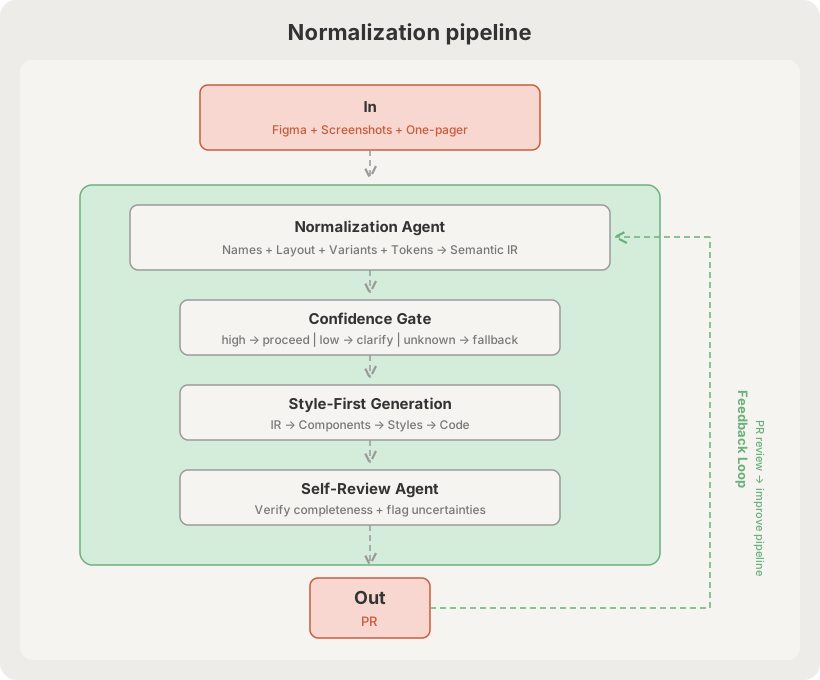
2.5 Confidence Gate Design
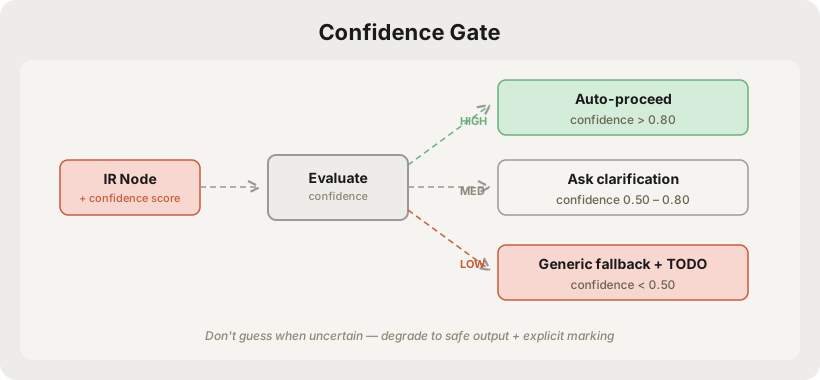
2.6 Estimated Impact
Disclaimer: The following figures are directional estimates based on manual analysis of ~20 Figma files across 3 internal business lines (criterion: what percentage of generated components can be merged without manual modification). Precise data requires validation through A/B controlled experiments during a pilot phase.
| Figma Standardization Level | Pre-improvement PR Quality | Post-improvement PR Quality (est.) | Manual Modifications |
|---|---|---|---|
| Standardized (full design system) | ~90% | ~95% | Minimal |
| Moderately standardized (partial tokens) | ~60% | ~80% | Some |
| Low standardization (random naming) | ~25% | ~65% | Moderate |
| Very poor (all absolute positioning) | ~10% | ~45% | Significant |
The fundamental improvement: shifting Figma quality's impact curve from linear to logarithmic — maximum gains at low standardization, diminishing returns at high standardization. Validating this hypothesis is itself a core pilot objective.
2.7 Feedback Loop: From Tool to Flywheel
The pipeline described above is one-directional — Figma in, PR out. But the real leverage is in making the pipeline learn from every PR review.
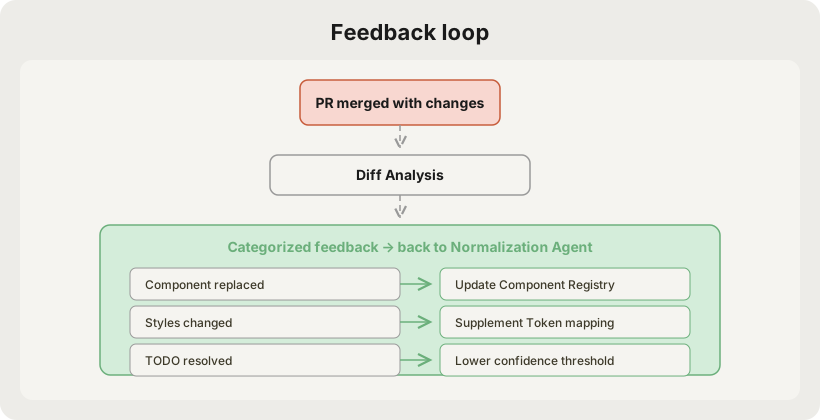
Implementation: run a lightweight diff analysis job after PR merge, categorize reviewer modifications, auto-generate Registry update suggestions (human-approved before taking effect).
This transforms the pipeline from a "tool that needs maintenance" into a "flywheel that gets more accurate with use" — every reviewed PR improves the next PR's quality.
2.8 Implementation Priority
- Component Registry + Name Matching — Highest ROI, covers 80% of naming chaos
- Token Reverse Lookup — Eliminates long-term tech debt from hardcoded styles
- Confidence Gate + Degradation Mechanism — Makes pipeline produce stable output for any input
- Vision Grounding (Layout Supplement) — Higher cost, targets heavy absolute-positioning users
Conclusion
Don't ask designers to change how they work. Absorb the non-standardization at the engineering layer.
| Strategy | Problem Solved | Implementation Cost | Maintenance Cost | ROI |
|---|---|---|---|---|
| Component Registry | Naming chaos | Low | Medium (sync with design system) | Very High |
| Token Reverse Lookup | Hardcoded colors | Low | Low | High |
| Variant Fragment Merging | Scattered frames | Medium | Low | High |
| Confidence Gate | Uncertainty management | Medium | Low | High |
| Feedback Loop | Pipeline degradation | Medium | Automated | High (long-term) |
| Visual Grounding | Absolute positioning | High | Low | Medium |
The essence of this architecture is a cognitive shift: Figma standardization isn't a binary — it's a continuous spectrum that can be compressed through engineering. The Normalization Layer doesn't eliminate chaos; it reduces chaos's impact from linear to logarithmic — enabling the pipeline to produce usable output at any input quality level, while the Feedback Loop continuously converges toward optimal.