What Figma Code Connect Changes: Revising the AI Coding Pipeline Strategy
This is a follow-up to Reducing AI's Dependency on Figma Standardization Through Engineering. Reading the original post first is recommended.
Background
The previous article proposed 5 engineering strategies centered on inserting a Normalization Layer between raw Figma signals and Claude Code. Component Registry was identified as the highest-ROI strategy — maintaining a Figma pattern → code component mapping table to shift dependency from designer naming conventions to maintainable engineering configuration.
Today I had a call with the Figma team and learned about Code Connect — which does essentially the same thing for the component mapping dimension, with a natural advantage of being Figma-native.
This means we have a powerful new option in our toolbox. The question isn't "which replaces which" — it's how to effectively combine all good tools and mechanisms to maximize pipeline output quality.
What Is Figma Code Connect
Code Connect is a Figma Dev Mode feature that links design components directly to their actual code implementations in your repository.
Two integration modes:
- UI Mode: Operates within Figma's interface via GitHub repo connection or manual component path entry. Language-agnostic, accessible to both designers and engineers.
- CLI Mode: Runs locally in your repository, supports property mappings and dynamic code examples. Works with React, React Native, HTML (Web Components/Angular/Vue), SwiftUI, and Jetpack Compose.
The key capability: Code Connect mappings are injected into Figma's MCP Server. When AI agents (like Claude Code) query design information via MCP, they receive context enriched with component mappings — including real code snippets and usage instructions from your codebase.
// .figma.tsx — Code Connect mapping file
import { Button } from './components/Button'
import figma from '@figma/code-connect'

figma.connect(Button, 'https://figma.com/file/xxx/Button', {
  props: {
    variant: figma.enum('Variant', {
      Primary: 'primary',
      Secondary: 'secondary',
    }),
    disabled: figma.boolean('Disabled'),
  },
  example: (props) => <Button variant={props.variant} disabled={props.disabled} />,
})
This configuration does exactly what the Component Registry YAML from the previous article did — except it's Figma-native, lower maintenance, and feeds directly to AI via MCP.
Coverage Analysis
Code Connect doesn't solve everything. Let's map it against the 5 standardization dimensions from the previous article:
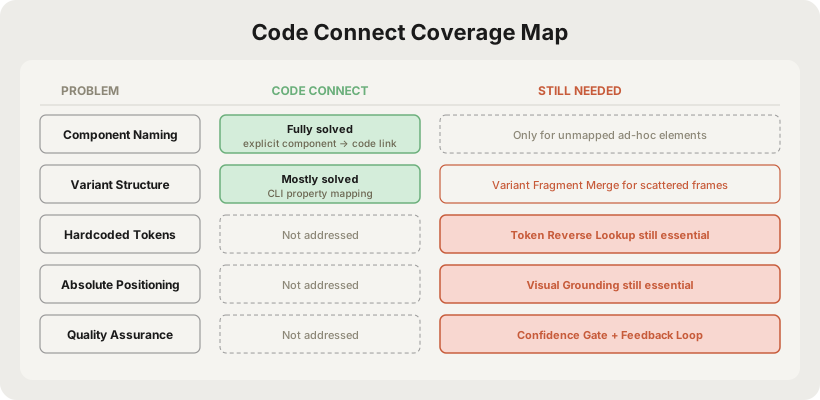
| Dimension | Code Connect Coverage | Still Needs Custom Engineering |
|---|---|---|
| Chaotic naming | ✅ Fully solved. Explicit component → code link bypasses naming entirely | Only unmapped ad-hoc elements need Preprocessing Agent |
| Variant fragmentation | ✅ Mostly solved. CLI property mapping covers this | Scattered independent frames still need Variant Fragment Merge |
| Hardcoded tokens | ❌ Not addressed. Code Connect handles component mapping, not style values | Token Reverse Lookup remains essential |
| Absolute positioning | ❌ Not addressed. Layout method is outside Code Connect's scope | Visual Grounding remains essential |
| Quality assurance | ❌ Not addressed. Code Connect doesn't judge output quality | Confidence Gate + Feedback Loop remain essential |
Conclusion: Code Connect precisely solves the highest-weight problem (component naming), partially solves the medium-weight problem (variant structure), but doesn't touch the high-weight token and layout problems.
Strategy Restructuring
With Code Connect in the picture, the original 5-strategy architecture needs reorganization:
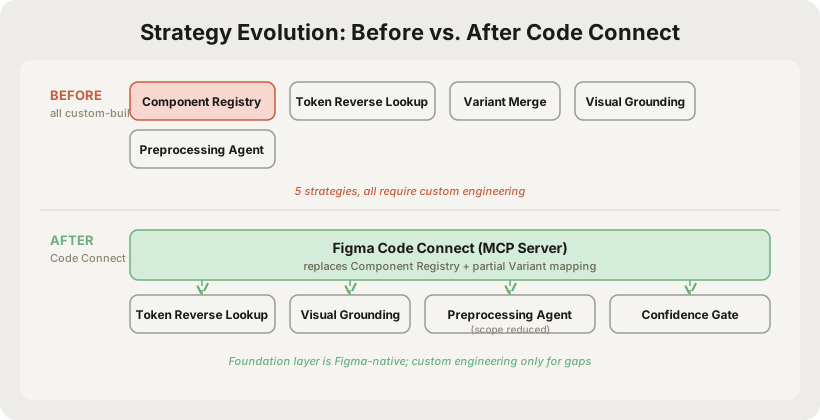
Summary of changes:
-
Component Registry + Code Connect working together. The biggest shift. For design system components, Code Connect provides Figma-native mapping that reaches AI agents directly via MCP Server. For ad-hoc elements or scenarios Code Connect doesn't cover, the self-built Registry continues as a complementary layer. They're not a replacement relationship — they're layered collaboration.
-
Preprocessing Agent → Reduced scope. Previously needed for all poorly-named components. Now only handles ad-hoc elements not covered by Code Connect — one-off custom frames, temporary components. Workload shifts from "process everything" to "process the long tail."
-
Token Reverse Lookup → Unchanged. Code Connect handles component mapping, not style value tokenization. This strategy's necessity is completely unaffected.
-
Visual Grounding → Unchanged. Layout method (Auto Layout vs absolute positioning) is outside Code Connect's capability.
-
Variant Fragment Merge → Reduced scope. Code Connect's CLI mode supports property mapping, solving most variant structure issues. But when designers don't use Figma's Variant feature at all (making different states as independent frames), Code Connect can't help — automatic merging is still needed.
Revised Pipeline
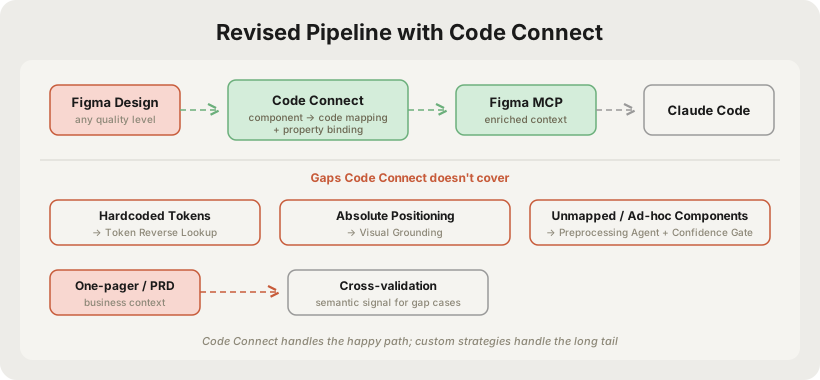
Compared to the previous article's architecture, the core difference is:
- Happy path (design system components): Code Connect → MCP Server → Claude Code. Zero custom code, precise mappings.
- Long tail (ad-hoc elements, hardcoded styles, absolute positioning): Custom Normalization strategies still provide the safety net.
This is a more efficient architecture — each tool does what it's best at, and together they cover the full spectrum.
Revised Implementation Priority
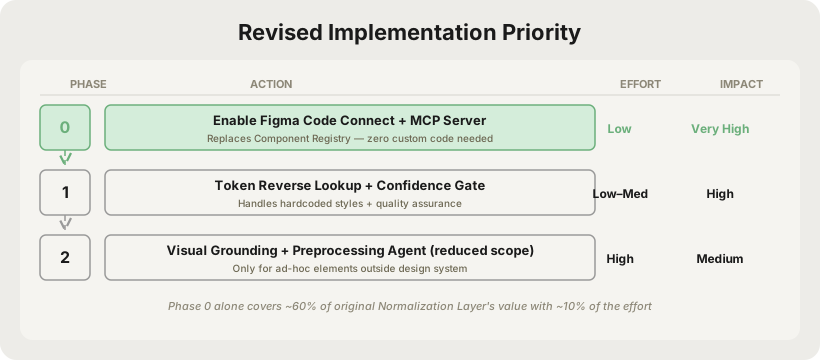
| Phase | Action | Implementation Cost | Impact |
|---|---|---|---|
| Phase 0 | Enable Code Connect + MCP Server | Low (configuration) | Very High — covers naming + variant mapping |
| Phase 1 | Token Reverse Lookup + Confidence Gate | Low–Medium | High — eliminates hardcode tech debt + quality safety net |
| Phase 2 | Visual Grounding + Preprocessing Agent (reduced scope) | High | Medium — only handles long tail outside design system |
Key shift: Code Connect as Phase 0 is an almost pure configuration step that quickly establishes baseline component mapping capability. Custom strategies start from Phase 1, focusing on dimensions Code Connect doesn't reach, making overall investment more targeted.
Practical Considerations
Before integrating Code Connect into the pipeline, several realities need assessment:
Plan limitations: Code Connect is only available on Organization and Enterprise plans. If your team is on Professional or Starter, the Code Connect layer is unavailable — the self-built Component Registry continues to handle component mapping, and the remaining strategies are unaffected.
Design system maturity: Code Connect assumes there are design system components to map. If designers haven't built Figma components (just raw frame assemblies), Code Connect has nothing to connect. In this case, you either need to first push for basic design system infrastructure, or rely entirely on custom Normalization strategies.
Maintenance model change: Code Connect mapping maintenance embeds into the Figma workflow — the Design System team maintains mappings alongside component management, which is more natural than standalone YAML. However, this requires the Design System team to accept the additional responsibility, requiring organizational alignment. If organizational buy-in is difficult, the self-built Registry owned by the engineering team may actually be more controllable.
Coverage ceiling: Even with thorough Code Connect configuration, real projects always contain significant page-level ad-hoc elements outside the design system. In practice, design system component coverage typically sits at 60-80%. The remaining 20-40% is uncovered territory that still needs custom strategies.
Revised Impact Estimates
Comparing against the previous article's estimates, with Code Connect introduced:
| Figma Standardization | No Pipeline | Previous (all custom) | Revised (Code Connect + custom) |
|---|---|---|---|
| Standardized (full design system) | ~90% | ~95% | ~97% |
| Moderate (partial tokens) | ~60% | ~80% | ~85% |
| Low (random naming) | ~25% | ~65% | ~70% |
| Very poor (all absolute) | ~10% | ~45% | ~48% |
The improvement margin looks modest (+2-5%), but the real story is:
- Implementation cost drops significantly. Phase 0 goes from building a Component Registry to configuring Code Connect — roughly 60% less engineering effort.
- Maintenance cost drops significantly. Figma-native mapping maintenance is more sustainable than standalone YAML.
- High-standardization scenarios approach the ceiling. When Figma is well-standardized and Code Connect is properly configured, AI component mapping approaches human-level accuracy.
The real ROI improvement isn't in the quality numbers — it's in the cost structure.
Conclusion
Figma Code Connect validates the core thesis of the previous article — component-to-code mapping is the key to solving AI coding quality. It adds a powerful native option to our toolbox.
The revised strategy is about effectively combining all available tools:
- Code Connect handles what it's best at — precise mapping of design system components, delivered directly to AI agents via MCP
- Custom strategies handle what Code Connect doesn't reach — token standardization, layout inference, ad-hoc element recognition, quality assurance
- The two work in layers, each contributing in their area of strength rather than replacing each other
The core principle remains unchanged: don't ask designers to change how they work. The implementation path is now richer — platform capabilities and custom engineering each play their role, combining to cover the full spectrum from design system components to ad-hoc elements. The goal is always the same: make the pipeline produce usable output at any input quality level.